Configure the server
On this page, you can learn about the arguments for server.
Arguments list
| Argument | Description |
|---|---|
| -port=8211 | Change the port number used to listen to the server. |
| -players=32 | Change the maximum number of participants on the server. |
| -useperfthreads -NoAsyncLoadingThread -UseMultithreadForDS | In v1.0 and later, leaving this parameter unset may improve performance. |
| -NumberOfWorkerThreadsServer=X | Setting number of process. Need to use with improve multi-threaded CPU performance arguments. For details. Check Regarding performances. |
| -publiclobby | Setup server as a community server. |
| -publicip=x.x.x.x | You can manually specify the global IP address of the network on which the server running. If not specified, it will be detected automatically. If it does not work well, try manual configuration. Note that this setting works for community servers. |
| -publicport=xxxx | You can manually specify the port number of the network on which the server running. If not specified, it will be detected automatically. If it does not work well, try manual configuration. Note that this setting works for community servers, but does not change the port number itself that the server uses for listening. |
| -logformat=text | Change log format. Text or Json |
| -enable-gamedata-api | Enable gamedata api |
Example
- Windows with Steam
- Windows with SteamCMD
- Linux with SteamCMD
Open the properties of the Palworld Dedicated Server in Steam and enter the startup options.
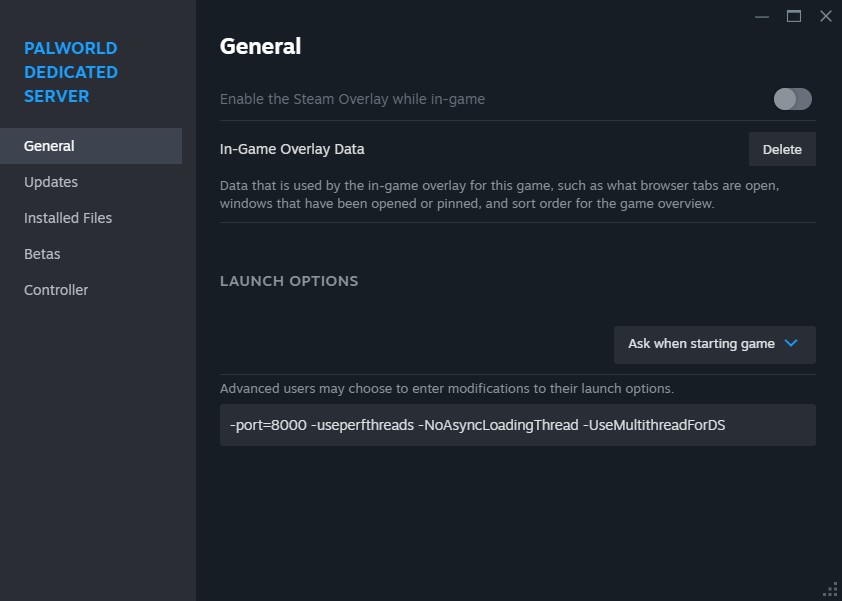
Append to the arguments at startup.
Example for change listen port number to 8000 and improve multithread setting.
PalServer.exe -port=8000 -useperfthreads -NoAsyncLoadingThread -UseMultithreadForDS
Append to the arguments at startup.
Example for change listen port number to 8000 and improve multithread setting.
./PalServer.sh -port=8000 -useperfthreads -NoAsyncLoadingThread -UseMultithreadForDS